Days where replying to emails eats up your morning, organizing spreadsheets delays lunch, and wrestling with meeting minutes pushes back your evening. It's not because you're bad at your job. It's because people are still stuck doing repetitive tasks that don't require human intervention.
When you hear "robot automation powerhouse," most people picture factories. But the automation we truly need first is right in our offices.
According to a Yonhap News report, as of 2023, South Korea's manufacturing robot density was 1,112 robots per 10,000 workers, more than six times the global average of 162. The IFR 2024 report (via G-Economy) also states that this sector has seen an average annual growth of about 5% since 2018. This trend isn't confined to factories. The spirit of automation is extending to office tasks like drafting emails, organizing documents, preparing report drafts, and connecting different applications. Now isn't the time to simply observe that "the age of robots has arrived"; it's time to assess what you can automate in your own daily routine.

Sounds Like Industry News, But It Directly Affects Your Desk
Korea Post projected that the global industrial robot installation market would reach an all-time high of $16.7 billion in 2025, with South Korea's robot market expected to maintain its third-place global ranking at approximately 10.2 trillion won (about $7.5 billion USD) by 2026. The IFR outlook, shared by the Korea Institute for Advancement of Technology, also identified AI and autonomy, IT/OT convergence, and addressing labor shortages as key trends for 2026.
In office terms, this is simple: work is shifting so that systems handle repetitive tasks, while people focus on judgment and coordination.
So, what automation can you start right at your desk?
What You Need Before Factory Robots: 'Software Robots'
For small business owners or freelancers, acquiring industrial robots is realistically difficult. In fact, individuals and small offices are far more likely to adopt AI-powered software automation tools than hardware robots.
For most people, a more realistic first step isn't a robotic arm, but "software robots." This means gradually incorporating tools that can handle daily repetitive clicks, copy-pasting, drafting, organizing, forwarding, and summarizing.
The key is that it's not a matter of "just using one AI and you're done." Perceived efficiency increases when drafting tools, information organization tools, and app connection tools work together. It's more important to combine tools by dividing their roles than to know many tools.
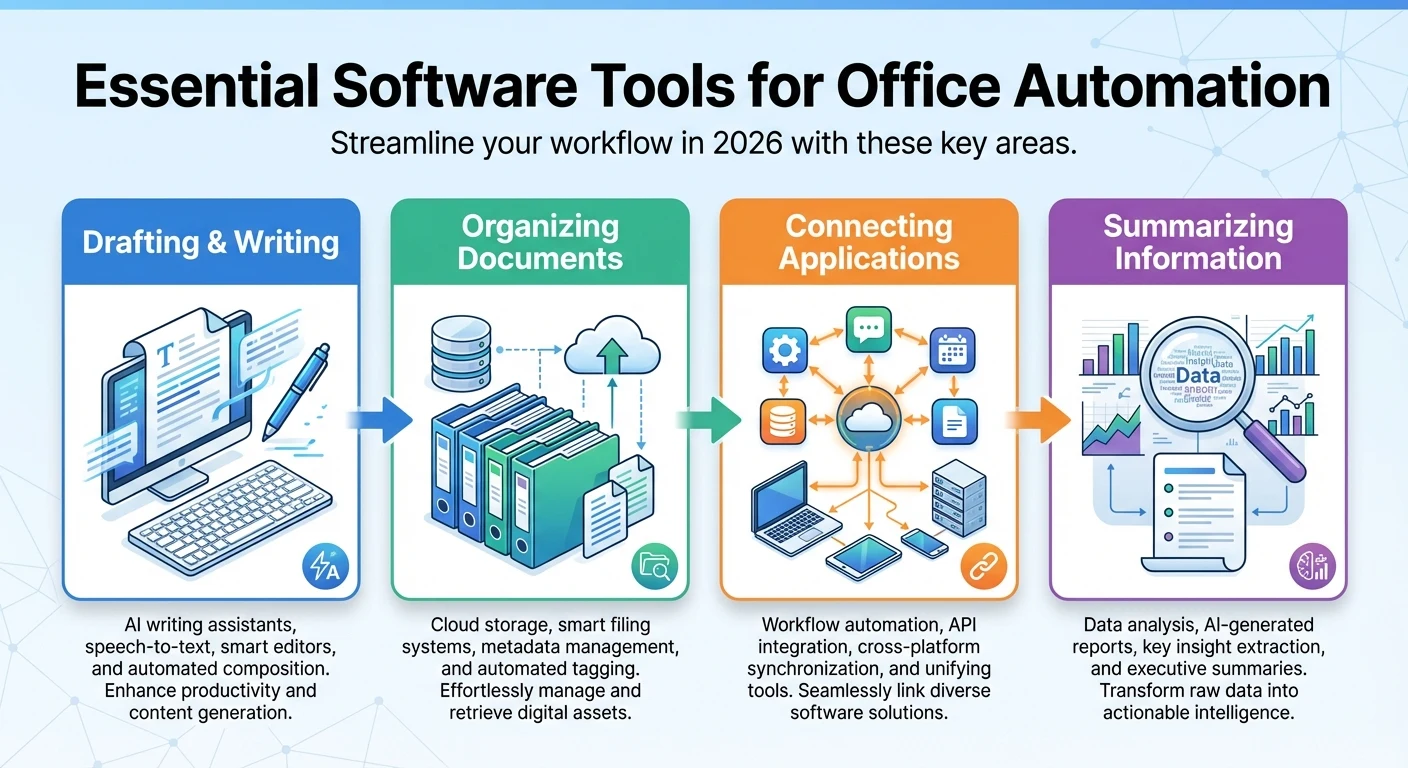
Tool Combinations for Professionals to Try in 2026
Rather than focusing on flashy features, it's better to start by identifying "where you get stuck most often." Dividing by role makes it much simpler.
If Drafting and Writing Always Get You Stuck
ChatGPT is excellent for quickly generating the framework for emails, proposals, and reports. It's particularly effective for those who spend too much time struggling with the first sentence. If you frequently need to read and summarize lengthy documents, Claude might be a better fit. The value of tools that reduce "reading time" increases with the volume of documents.
If Scattered Information Breaks Your Workflow
Notion AI's strength lies in its ability to centralize meeting notes, work documents, and project memos, then assist with organization, search, and writing. It's ideal for those who waste time searching because messages, documents, and personal notes are scattered across different platforms.
If Excel and Number Crunching Feel Overwhelming
Microsoft Copilot helps with automatic Excel formula generation, visualization recommendations, and summary report creation. It's a tool focused on interpreting numbers and quickly generating results, rather than memorizing formulas.
If You Frequently Switch Between Apps
Zapier is a leading tool for automating repetitive tasks by connecting various apps without programming. You can create workflows that send messenger notifications when a form response arrives and simultaneously record it in a document or database. For more structured repetitive tasks, RPA solutions like UiPath are available, with figures suggesting 30-40% automation of existing tasks and 35-65% cost savings; however, actual results vary significantly depending on work structure and implementation level.
If Making Your Materials Look Good Takes Too Much Time
Canva Magic Design or Gamma can quickly reduce the time spent designing presentations, social media cards, and reports. They are particularly practical for those who lack time for visualization rather than design skills.
Now, the question isn't "what to use," but "in what order to integrate them."
Don't Automate All At Once, Start With This Sequence
Trying to solve everything with one large platform from the start is likely to fail. Introducing tools without a clear purpose often leads to them becoming white elephants, and small to medium-sized businesses (SMBs) are particularly vulnerable due to limited learning time and operational capacity.
Step 1 — List just three repetitive tasks. Start with tasks that repeat weekly and cause high fatigue, such as drafting emails, organizing meeting minutes, or preparing Excel reports.
Step 2 — Add one tool per role. One AI for drafting, one tool for organization, and one automation for app connections is enough to get started.
Step 3 — Verify the time saved. The criterion for continued use shouldn't be flashy features, but whether you've genuinely saved even one hour a week.
Key takeaway: The primary goal of automation isn't labor cost innovation, but reducing the points where you're drained daily.
Automation Can Sometimes Create More Work
Not all automation is beneficial. Platforms with too many features can have complex interfaces, ultimately becoming tools used by only one or two team members.
Costs must also be considered realistically. For small organizations, the subscription fees of some high-performance AI collaboration platforms might feel more like "increased fixed costs" than "time savings." It's safer to start by validating small workflows with free or low-cost tools.
Security is also crucial. When using AI tools, you must first check privacy and internal document handling policies. For sensitive data like customer information, contracts, or HR records, it's best to establish guidelines before uploading.
Caution: The most stable structure is one where AI serves as an auxiliary tool, and final judgment rests with a human.
Ultimately, It's Not About "Grand Automation," But "Less Exhausting Days"
The scene at CES 2026, where Samsung Electronics, LG Electronics, and Hyundai Motor Group showcased lifestyle-oriented robots and humanoids, undoubtedly highlighted Korea's technological leadership. However, for most readers today, the more significant change isn't that grand spectacle, but the daily experience of reducing one repetitive click or cutting drafting time in half.
The phrase "robot automation powerhouse" is no longer distant industry news; it's a reality connected to how you work. If you're starting now, there's only one thing to do: pick one repetitive task that bothered you most this week, and apply automation to just that task.